
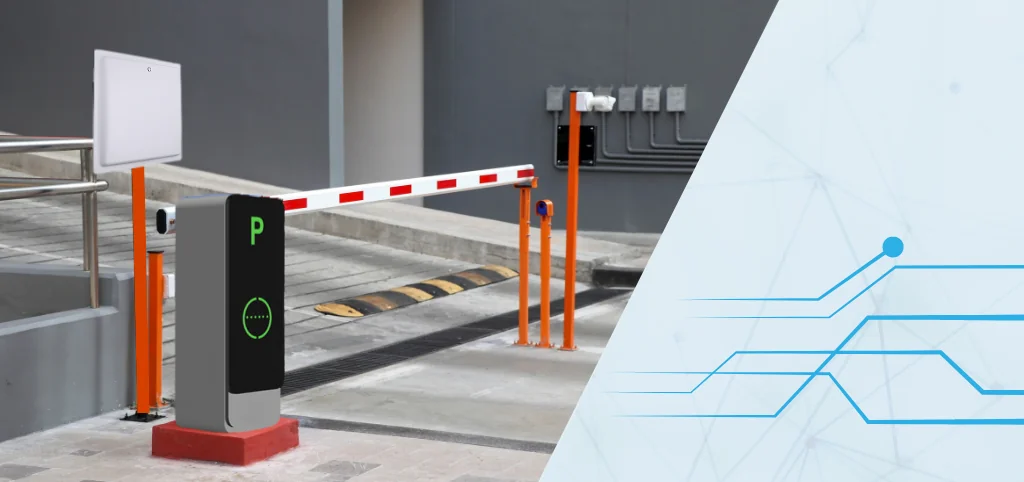
We’re thrilled to introduce our latest breakthrough for the Access Control and Parking sector: the new Model RFID Reader P-RF90. This isn’t just another piece of hardware; it’s a revolutionary device designed to simplify and enhance your access control and parking management systems. Let’s explore why the P-RF90 is a must-have for your operations.
Key Features of the Model P-RF90
Built-In Relay Feature
One of the coolest features of our RFID Readers is the built-in relay. This means the P-RF90 can directly trigger access control devices like boom barriers, flap barriers, or light indications. No more fussing with additional controllers! This feature streamlines your setup and makes everything run more smoothly.
Cost-Effectiveness
We know that efficiency and affordability are crucial. That’s why we’ve made sure the P-RF90 offers top-notch functionality without breaking the bank. It’s an advanced piece of technology that delivers great value, especially for parking companies looking to optimize their budgets.
Why Choose the Model P-RF90 RFID Reader?
Simplified Operations
Our RFID Readers are designed to make your life easier. It simplifies access control and parking management, making operations more straightforward and intuitive. This means less hassle for your staff and a better experience for your customers.
Significant Cost Savings
With the P-RF90, you don’t need extra controllers or additional hardware. This all-in-one solution helps you save on equipment costs and reduces maintenance needs. Over time, these savings add up, making the P-RF90 a smart investment.
**Enhanced Efficiency
** Efficiency is at the heart of the P-RF90’s design. By streamlining integration and functionality, this RFID Reader boosts the speed and reliability of your operations. This means smoother workflows for your team and better service for your customers.
Transform Your Access Control and Parking Systems The Model P-RF90 RFID Reader isn’t just a piece of hardware; it’s a comprehensive solution designed to elevate your access control and parking systems. With its built-in relay feature, cost-effective design, and efficiency-boosting capabilities, the P-RF90 is set to become an essential part of your toolkit.
How RFID Access Control Works: The Technology Behind the Card Tap
RFID-based access control is one of the most widespread applications of the technology — billions of access cards, fobs, and vehicle tags are in daily use worldwide. Understanding how the system works helps in specifying the right hardware and designing a reliable installation.
The Reader-Tag Communication Chain
In a typical RFID access control installation, the reader is mounted at the access point — a door, gate, or barrier. When an authorised user presents their credential (card, fob, or vehicle tag), the reader energises the tag with its RF field, the tag responds with its unique identifier, and the reader passes that identifier to the access control software. The software checks the identifier against its authorised list, checks access permissions for the time and zone, and sends an open signal to the door lock, barrier, or gate.
For pedestrian access, the most common technology is HF RFID (13.56 MHz) using Mifare, DESFire, or LEGIC cards and readers — read range of a few centimetres, appropriate for deliberate card-tap access. For vehicle access, UHF RFID (865–867 MHz in India) enables hands-free reads at the windshield from the lane reader — read range of 3–8 metres depending on tag and antenna selection.
The P-RF90 is a UHF RFID reader with an integrated relay — specifically designed for vehicle access and parking applications where the reader must both identify the vehicle and directly command the barrier open, without an intermediate controller. This integrated design simplifies installation significantly.
What “Integrated Relay” Means for Installers
A conventional RFID reader outputs the tag read to an access controller (a separate hardware box), which then activates the barrier relay based on its access logic. This two-device approach adds cost, cabling, and a potential failure point.
The P-RF90’s integrated relay eliminates the access controller for straightforward applications. The reader itself evaluates the read (against a whitelist stored on the reader or managed via the connected software), and if authorised, closes its internal relay — which drives the barrier or gate directly. For parking and simple vehicle access deployments, this architecture reduces hardware count and simplifies the installation significantly.
Access Control System Design: Beyond the Reader
A complete RFID access control or parking management system is more than a reader and a barrier. The architecture includes credential management, access rules, event logging, and integration with other systems. Understanding the full picture helps in planning deployments that are secure, manageable, and scalable.
Credential Management
Every RFID access system has a credential database: the list of authorised tags (card UIDs or vehicle tag EPCs) and their associated permissions. Who can access which zones, at which times, on which days. Who has visitor access limited to a specific date. Who has been suspended.
This database must be managed — adding, modifying, and revoking credentials — through an administrative interface. For small deployments, this may be a simple whitelist configured in the reader’s web interface. For enterprise deployments, it’s an access control software platform integrated with HR systems so that credentials are automatically activated and deactivated based on employment status.
Event Logging and Audit Trails
Every read event — credential presented, access granted or denied, time, location — should be logged. This log is the audit trail for security investigations, compliance reporting, and operational management. How many people entered the facility today? When did the CEO’s car enter and exit? Was the emergency exit used? All of these questions are answered from the event log.
The P-RF90’s compatibility with POXO’s access control software ensures that every vehicle read is logged with a timestamp, lane identity, vehicle identifier, and access decision. This log is searchable, exportable, and retained for the defined audit period.
Integration with Parking Management Software
For parking applications, access control is one component of a broader parking management platform. The full system includes:
- Space management — tracking which spaces are occupied, through UHF reads at zone entrances or bay-level sensors.
- Billing and payment — calculating dwell time and generating charges for commercial parking.
- Booking and reservation — allowing drivers to pre-book spaces via an app.
- Occupancy displays — guiding drivers to available spaces with digital signage.
- ANPR integration — combining RFID vehicle identification with license plate recognition for double-verification.
POXO’s smart parking platform integrates all of these components, with the P-RF90 handling the RFID identification at entry and exit lanes.
Practical Use Case: P-RF90 in a Corporate Campus Access and Parking System
A corporate campus with approximately 800 registered employee vehicles, 50 visitor spaces, and three entry lanes deployed POXO’s RFID access and parking solution. Before deployment, access was managed with a guard-operated boom barrier and manual entry log — slow, inconsistent, and creating morning queues.
After deploying P-RF90 readers at all three entry lanes and two exit lanes with POXO’s parking management platform:
- Employee vehicles with registered windshield RFID tags enter without stopping — read at approach speed triggers the boom barrier automatically. Average lane processing time dropped from 12 seconds (manual check) to under 2 seconds (automatic read-and-open).
- Visitor vehicles not carrying RFID tags are directed to the visitor lane, where an intercom connects to reception. A time-limited visitor pass (QR code or temporary tag) is issued.
- All vehicle movements are logged automatically — entry time, exit time, lane, and vehicle identity.
- The ANPR camera integrated with the RFID reader provides a secondary check: vehicles whose RFID tag doesn’t match their registered number plate trigger an alert for guard review.
- Security team can pull an instant report of all vehicles currently on campus, vehicles that entered but haven’t exited, and complete entry/exit history for any vehicle.
Morning queue times dropped significantly, guard workload on routine access shifted to exception handling, and the facility security manager has audit-ready vehicle movement records available on demand.
UHF vs. HF for Access Control: Choosing the Right Frequency
The choice between UHF and HF RFID for access control depends on the read geometry and the type of credential.
| Factor | HF RFID (13.56 MHz) | UHF RFID (865-867 MHz, India) |
|---|---|---|
| Read range | Centimetres (deliberate tap) | Metres (hands-free) |
| Typical credentials | Smart cards, fobs | Vehicle windshield tags |
| Application | Pedestrian door access | Vehicle gate/parking access |
| Integration | Smart card readers, access controllers | Readers with relay (like P-RF90) |
| Reader mounting | Door frame, wall | Lane overhead or barrier arm |
Most complete access control deployments use both: HF readers for pedestrian doors and turnstiles (deliberate card tap), and UHF readers like the P-RF90 for vehicle lanes (automatic hands-free identification). POXO’s access control platform manages credentials and permissions across both technology layers in a unified interface.
Implementation Guidance: Deploying RFID Access Control and Parking
Step 1 — Map Your Access Points
List every controlled access point: vehicle lanes, pedestrian doors, turnstiles, emergency exits. For each, identify the technology type needed (UHF for vehicle lanes, HF for pedestrian doors), the physical mounting options, and the door/barrier controller interface.
Step 2 — Define Credential Types and Access Rules
Specify who needs access to what, and under what conditions. Employee vehicle access 24/7? Contractor access limited to business hours and specific zones? Visitor access limited to one day? This access rule definition drives the software configuration and must be done before deployment, not after.
Step 3 — Plan the Tag Programme
For vehicle access, decide how tags are issued, installed, and deactivated. Windshield sticker tags need to be applied to vehicles once and registered in the system. Define the process for new vehicles, departing employees, and vehicle changes. For visitor access, define the temporary credential process.
Step 4 — Install and Commission Hardware
Mount readers at the correct height and angle for reliable reads at the approach speed and geometry of your lanes. For vehicle access, typical UHF reader mounting is overhead (gantry or boom arm) aimed at the windshield zone, or at barrier height aimed at a bumper or number plate zone tag. Commission by testing reads across the expected range of vehicle types and positions in the lane.
Step 5 — Configure Software and Integrate
Load the credential database, configure access rules, and integrate with any complementary systems — HR (for auto-provisioning), ANPR cameras, payment systems (for paid parking), or building management systems. Run an end-to-end test with a sample of vehicles covering authorised, unauthorised, and visitor scenarios.
Frequently Asked Questions
What is the read range of the P-RF90 for vehicle access?
Read range depends on the antenna configuration, the vehicle’s RFID tag type and mounting position, and the physical environment of the lane (surrounding metal structures, lane width). In typical vehicle lane conditions with correctly mounted windshield tags, the P-RF90 reads reliably at 3–8 metres of approach distance — sufficient for the barrier to open before the vehicle needs to stop. For high-speed lane applications, longer-range antennas can extend this further. POXO configures antenna selection and reader settings based on each site’s specific lane geometry and vehicle speed.
Can the P-RF90 be used with both HF cards and UHF vehicle tags on the same site?
The P-RF90 is a UHF reader, designed for vehicle tags in the 865–867 MHz band. HF card readers (for Mifare or DESFire proximity cards) are separate devices operating at 13.56 MHz. A site using both credential types needs both reader types — P-RF90 for vehicle lanes and HF readers for pedestrian doors. POXO’s access control platform manages both populations through a single administrative interface, with a unified credential database and event log.
How secure is RFID-based access control?
The security of RFID access control depends on the protocol and tag type. Older LF (125 kHz) proximity systems are vulnerable to cloning with cheap readers. Modern HF systems using DESFire EV2/EV3 or Mifare Plus chips employ cryptographic authentication that is significantly harder to clone. UHF vehicle tags used for access can incorporate cryptographic measures and are combined with secondary checks (ANPR, guard review) in high-security applications. For most commercial and industrial sites, modern HF or UHF RFID provides appropriate security when combined with proper credential management and access rule enforcement.
POXO’s Access Control and Parking Management Solutions
POXO’s complete vehicle access and parking management platform is built around the P-RF90 reader and our access control software, integrated with boom barriers, ANPR cameras, payment systems, and parking management dashboards. We deploy complete solutions — from hardware supply and installation to software configuration, integration, and post-deployment support.
Our vehicle access deployments serve corporate campuses, industrial facilities, logistics yards, multi-level parking facilities, and gated communities. Every deployment is configured for India’s 865–867 MHz band, with properly approved hardware and integration to the systems you already use.
If you’re evaluating RFID access control or smart parking for your facility, explore POXO’s smart parking solution and vehicle access control solution, or contact our team for a site-specific consultation.