
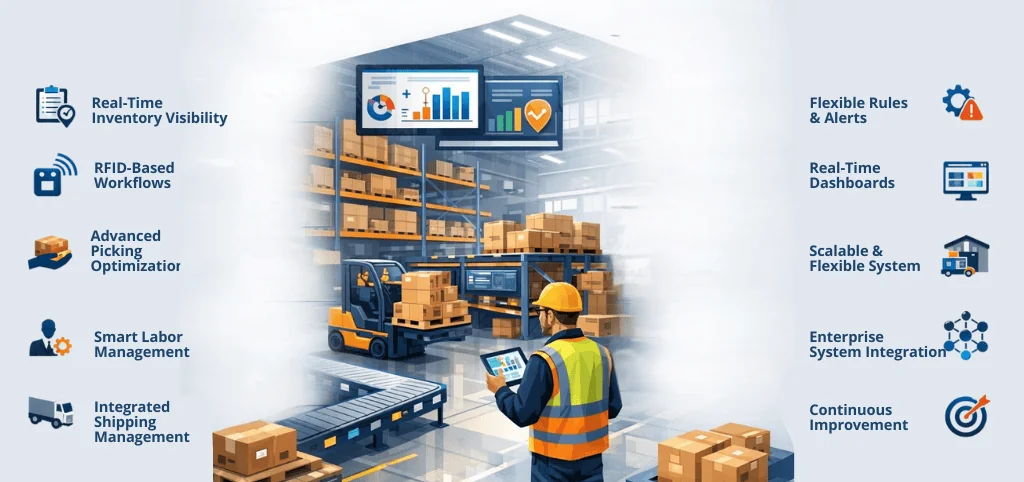
In 2026, a warehouse is no longer just a storage space, it is a data-driven fulfilment engine. If your team is still juggling fragmented spreadsheets, manual pick lists, and “best-guess” inventory counts, your warehouse isn’t just a cost center it’s a bottleneck.
Stop Firefighting. Start Scaling.
Every minute spent searching for a misplaced SKU or correcting a shipping error quietly erodes your margins. A modern Warehouse Management System (WMS) is the only way to transform that chaos into a high-speed competitive advantage. But with so many options on the market, how do you separate the “legacy tools” from the “future-proof platforms”?
Below, we break down the 10 non-negotiable WMS features that define high-performance operations in 2026 and why brands like POXO are moving toward unified, RFID-integrated ecosystems to win the fulfilment race.
What Is a WMS (Warehouse Management System)?
A Warehouse Management System (WMS) is software that helps businesses manage and control daily warehouse operations. It tracks inventory, guides warehouse workers, manages orders, and ensures goods move smoothly from receiving to shipping.
In simple terms, a WMS tells warehouse teams what to do, where to do it, and when to do it, while keeping inventory and order data accurate in real time.
1. Real-Time Inventory Visibility and Accuracy
Accurate inventory is the foundation of every successful warehouse. A modern WMS must provide real-time visibility into stock levels across all locations, bins, and SKUs. Inventory updates should occur instantly as goods are received, moved, picked, packed, or shipped.
When inventory accuracy is high, businesses reduce stock outs, avoid overstocking, and free up working capital. Real-time visibility also enables confident order promising and smoother coordination with upstream and downstream systems.
2. RFID-Based Guided Warehouse Workflows
Manual processes introduce variability and errors that are difficult to scale. A capable WMS replaces paper-based tasks with guided, RFID -based workflows for receiving, put-away, picking, packing, and replenishment.
By directing warehouse staff step by step and validating each action through RFID tags, the system reduces mis-picks and shrinkage while increasing throughput. This structured approach also shortens training time for new employees and ensures consistent performance across shifts and sites.
3. Advanced Picking Optimization
Advanced picking optimisation helps warehouses fulfil orders faster and more accurately. It does this by using smart picking methods that reduce unnecessary movement.
A Warehouse Management System groups and assigns picking tasks based on order priority, product location, and warehouse layout. This allows workers to pick multiple orders efficiently in one trip and helps warehouses handle high order volumes smoothly, especially during busy periods.
4. Smart Task Interleaving and Labor Management
Labour is one of the highest operating costs in a warehouse. A modern WMS improves labour efficiency by intelligently interleaving tasks. Instead of workers completing one type of task at a time, the system assigns the next most efficient task based on location, priority, and resource availability.
This approach minimises empty travel, increases the number of lines picked per hour, and helps supervisors allocate labour more effectively. Over time, it supports data-driven labour planning rather than reactive firefighting.
5. Integrated Shipping and Carrier Management
Shipping should not require switching between multiple carrier portals and manual data entry. A strong WMS integrates shipping directly into warehouse workflows, enabling:
• Real-time rate comparison
• Automated label generation
• Shipment tracking and status updates
This integration speeds up dispatch, reduces errors, and provides end-to-end order visibility. It also allows operations teams to make smarter carrier decisions based on cost, service level, and delivery performance.
6. Flexible Rules and Easy Problem Handling
No two warehouses operate the same way. The best WMS for growing warehouses must be configurable enough to support unique business rules without custom development. This includes allocation logic, replenishment triggers, priority handling, and packaging constraints.
Equally important is robust exception handling. When inventory discrepancies, order changes, or operational issues arise, the system should flag them in real time and guide users toward resolution. This prevents small issues from escalating into missed shipments or customer dissatisfaction.
7. Real-Time Dashboards and Performance Analytics
Real-time dashboards and performance analytics give warehouse teams instant visibility into daily operations. A Warehouse Management System displays key information such as order status, picking progress, labour productivity, and operational bottlenecks in one place.
This allows managers to monitor performance in real time, identify issues, and make informed decisions without waiting for manual reports. As a result, the warehouse runs more smoothly and efficiently.
8. Scalability Across Volume, Locations, and Complexity
Warehouses rarely remain static. Seasonal peaks, new sales channels, additional SKUs, and new facilities all introduce complexity. A future-ready WMS must scale without degrading performance or requiring major system changes.
Scalability means handling higher order volumes, supporting multiple warehouses, and adapting workflows as operations evolve. Systems that cannot flex with growth often become constraints rather than enablers.
9. Seamless Integration with Enterprise Systems
A WMS does not operate in isolation. It must integrate smoothly with ERP systems, order management platforms, automation equipment, and analytics tools. These integrations ensure data flows consistently across the enterprise.
When systems are connected, inventory, orders, and financial data remain aligned. This reduces reconciliation work, improves forecasting accuracy, and supports end-to-end operational transparency.
10. Data-Driven Continuous Improvement Capabilities
The most effective WMS platforms do more than execute daily tasks. They create a feedback loop that drives continuous improvement. By capturing detailed operational data, the system enables teams to analyse trends, test process changes, and measure results objectively.
Teams leverage this capability to turn the warehouse into a learning organisation, making decisions based on evidence instead of routine habits. Over time, it leads to sustained gains in productivity, accuracy, and cost control.
Why These Features Matter in Practice
Many warehouses believe they have a capacity problem when the real issue is visibility. Without a modern WMS, leaders are forced into reactive decision-making, manual workarounds, and constant firefighting during demand spikes. Errors go unnoticed until they impact customers, and inefficiencies quietly erode margins.
Industry benchmarks consistently show that warehouses using modern WMS platforms improve picking accuracy by 20–30% and reduce fulfilment cycle times within the first year.
Teams using a unified, feature-rich WMS such asPOXO typically see measurable improvements in pick efficiency, inventory accuracy, and operational visibility within months of deployment. These gains are achieved not by working harder, but by working smarter with real-time data and optimised workflows.
The Strategic Role of WMS Software
A Warehouse Management System is no longer a back-office tool. It is a strategic platform that determines how and accurately a business can fulfil orders, adapt to change, and scale operations. In an environment where customer expectations and operational complexity continue to rise, the right WMS becomes a decisive competitive advantage.
Choosing WMS software with these ten features ensures that the warehouse operates as a coordinated, resilient, and data-driven hub. The result is not just better warehouse performance, but stronger customer satisfaction, healthier margins, and a foundation built for long-term growth.
For organisations evaluating WMS options, understanding these features provides a practical framework for selecting a platform that supports both immediate operational needs and long-term growth.
Frequently Asked Questions
Q1: How long does a typical WMS implementation take in 2026?
A: While legacy systems used to take 6–12 months, modern cloud-based solutions like POXO can be implemented in as little as 4–12 weeks. The timeline depends largely on the complexity of your integrations and the quality of your existing inventory data.
Q2: Can I integrate a WMS with my current ERP (like SAP, Oracle, or Tally)?
A: Yes. Seamless integration is a core requirement for modern warehouses. Most high-quality WMS platforms use open APIs to ensure real-time data flow between your warehouse, sales orders, and financial records, eliminating manual reconciliation.
Q3: What is the average ROI (Return on Investment) for a WMS?
A: Most warehouses see a full return on investment within 12 to 24 months. This is achieved through a 20–30% increase in picking accuracy, significant reductions in labour costs via route optimisation, and a decrease in carrying costs by preventing overstocking.
Q4: Do I really need RFID, or are Barcodes enough?
A: While barcodes are a great first step, RFID is the standard for 2026. RFID allows for “bulk scanning” (scanning an entire pallet in seconds) and eliminates the “line-of-sight” requirement of barcodes, increasing receiving and shipping speeds by up to 50%.
Q5: Is a WMS only for large enterprises?
A: Not anymore. Scalable, cloud-based WMS platforms are now accessible for mid-sized growing businesses. If you handle more than 50 orders a day or have multiple SKU locations, the efficiency gains of a WMS will likely outweigh the monthly subscription cost.